
What you know about someone, in one place.
Most contact books hold a name, a number, and an email. Tribe holds the rest: where they grew up, what their kids are into, what they are proud of, what to leave alone. Each person gets a profile you fill in a category at a time, and a score that tells you how well you actually know them.

Where the idea comes from
Harvey Mackay, in his book Swim with the Sharks Without Being Eaten Alive, argued that business relationships run on specifics: remembering that a client's daughter plays varsity soccer, or that they summer in Maine. His Customer Profile is a list of 66 questions to ask and write down about the people you deal with.
Tribe takes that idea and turns it into a set of fields in a database that you can search. It does not ship the paper questionnaire, and it does not answer the questions for you. You (or an agent working for you) fill the profile in.
Eleven categories
A profile is eleven collapsible categories. Identity is open when you arrive; the rest are one click away, each with a count of what is filled in.
| Identity | Nickname, prefix and suffix, how to pronounce the name, pronouns, birthday, birthplace, and physical notes. |
|---|---|
| Contact information | Website, time zone, and preferred contact method (email, phone, text, or in person), beside the emails and numbers you gave when you created the contact. |
| Education background | A flag for whether education is a sore subject, and a list of schools you add and remove. |
| Military service | Branch, rank, years of service, duty stations, and decorations. |
| Family | Marital status, spouse's name, job, education, and interests, anniversary, pets, family notes, and a list of children with their schooling and interests. |
| Career and business | Company, title, department, career start, a LinkedIn link, management style, long-term and immediate business goals, mentors, status symbols, and an employment history. |
| Interests and hobbies | Hobbies, sports played and watched, vacation habits, reading, favorite restaurants, dietary preferences, cars, music, travel, and topics they like to talk about. |
| Social and community | Political activity and party, religion and how active, and community involvement. Behind the privacy shield. |
| Drinking and smoking | Whether they drink and what, whether drinking offends them, whether they smoke and whether they object to it. Behind the privacy shield. |
| Personality and goals | Adjectives that describe them, proudest achievement, personal goals, who they want to impress, and how they see themselves. |
| Relationship intelligence | Relationship type (client, prospect, colleague, friend, family, mentor, mentee, vendor, partner, or acquaintance), strength (strong, good, developing, weak, or stale), how you met, when, sensitive topics, strong opinions, their key problems, and whether you can help. |
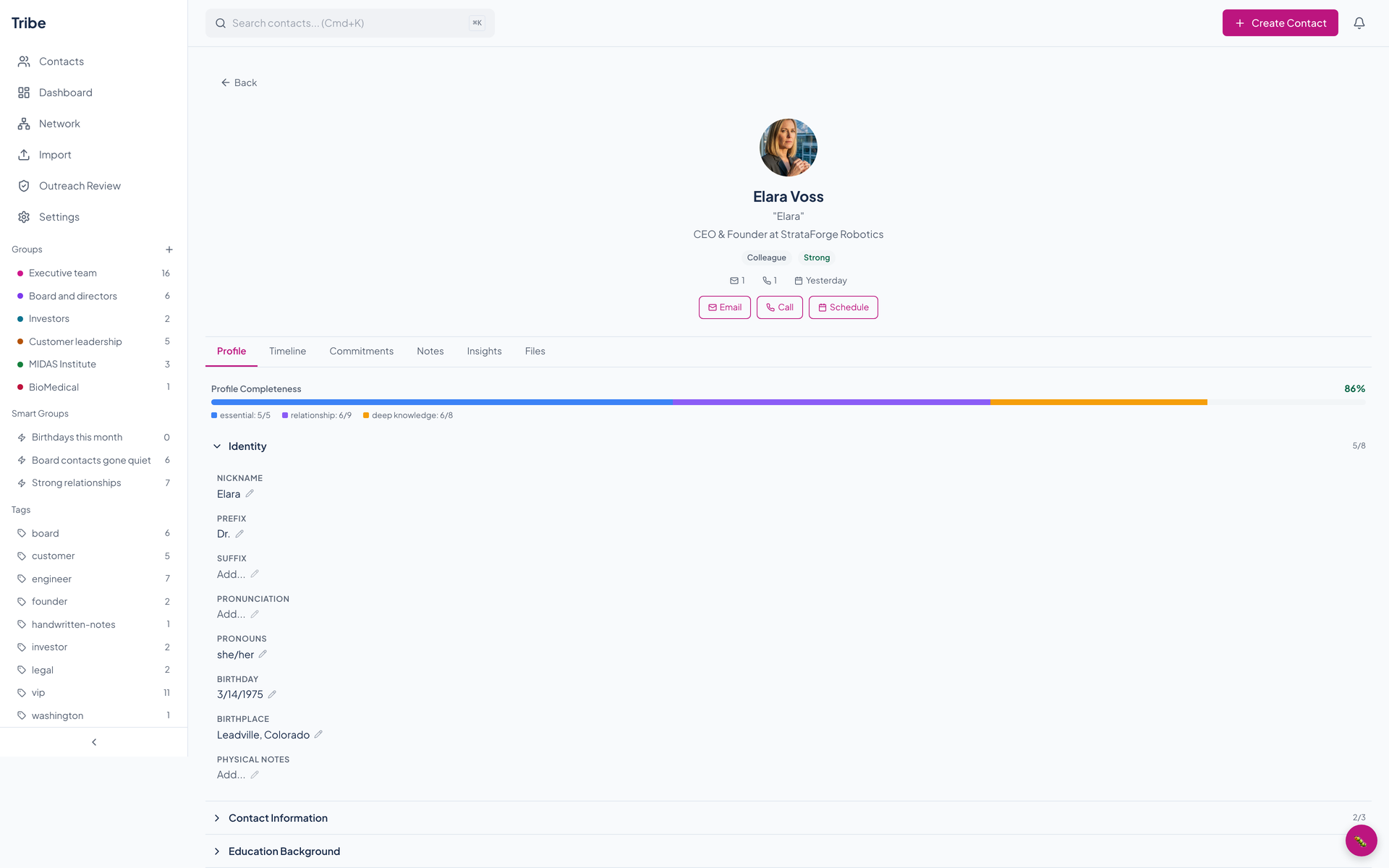
Click a field to edit it, press Enter to save and Escape to cancel. Birthdays and anniversaries you enter feed the dashboard's upcoming dates.
The completeness score
Every profile carries a score from 0 to 100 percent, and the bar shows how it breaks down. It counts 22 fields in three tiers, and a tier's share is the weight of what is filled in.
| Tier | Share of the score | What it counts |
|---|---|---|
| Essential | 40 percent | Full name, at least one email or phone, company, title, and relationship type. Five fields. |
| Relationship | 35 percent | Spouse, marital status, children, hobbies, conversational interests, personal goals (two), how you met, and when. Nine fields, four of them counted at half weight. |
| Deep knowledge | 25 percent | Adjectives, proudest achievement, sensitive topics, strong opinions, vacation habits, favorite restaurants, who they want to impress, and self image. Eight fields. |
A field counts once it holds something other than blank text or an empty list. The score updates as you edit.
A privacy shield for the sensitive parts
Political activity and party, religion, drinking, smoking, and health notes are the kind of facts you want to remember and not leave on screen. Tribe stores eleven fields of this kind encrypted with AES-256-GCM, each with its own random nonce, using a key from the server's configuration.
On screen, the two sensitive categories show a line that says Sensitive information with a Reveal button. Press it to see the fields and Hide to put them away again.
- What the shield is
- A screen cover. It keeps a profile from showing politics or religion to anyone looking over your shoulder.
- What it is not
- An access control. A signed-in user's request gets the decrypted values from the API, and a vCard export includes the decrypted sensitive notes. The shield hides them on the page, not from the person who owns the contact book.
The tabs on a profile
| Profile | The eleven categories and the completeness bar. |
|---|---|
| Timeline | Your notes and the email and meeting entries Tribe holds for the person. See Relationships. |
| Notes | Write a note, pin the ones that matter, read the rest newest first. |
| Insights | Insights written about the relationship and five conversation starters. See Intelligence. |
| Commitments and Files | Both tabs are on the page and say coming soon. |
Above the tabs, Email and Call open your mail and phone apps with the person's primary address and number. The Schedule button is not connected yet.
Adding someone
Create Contact in the top bar asks for a full name, an email, a phone number, a company, a title, and a relationship type. Everything else you add from the profile, or import in bulk from a file.
Questions about this tool?
Write to Renkara Media Group and a person will answer.